IntroducingQwen Image Layered
Qwen Image Layered focuses on automatically splitting a single image into multiple independent RGBA layers, turning a flat picture into an editable layered project. Through semantic-aware decomposition and physical separation of layers, Qwen Image Layered enables high-fidelity operations at the layer level for tasks such as repainting characters, replacing backgrounds, removing objects, and editing text, greatly boosting creative production efficiency.
Key Features
Turn Flat Images into Editable Layers
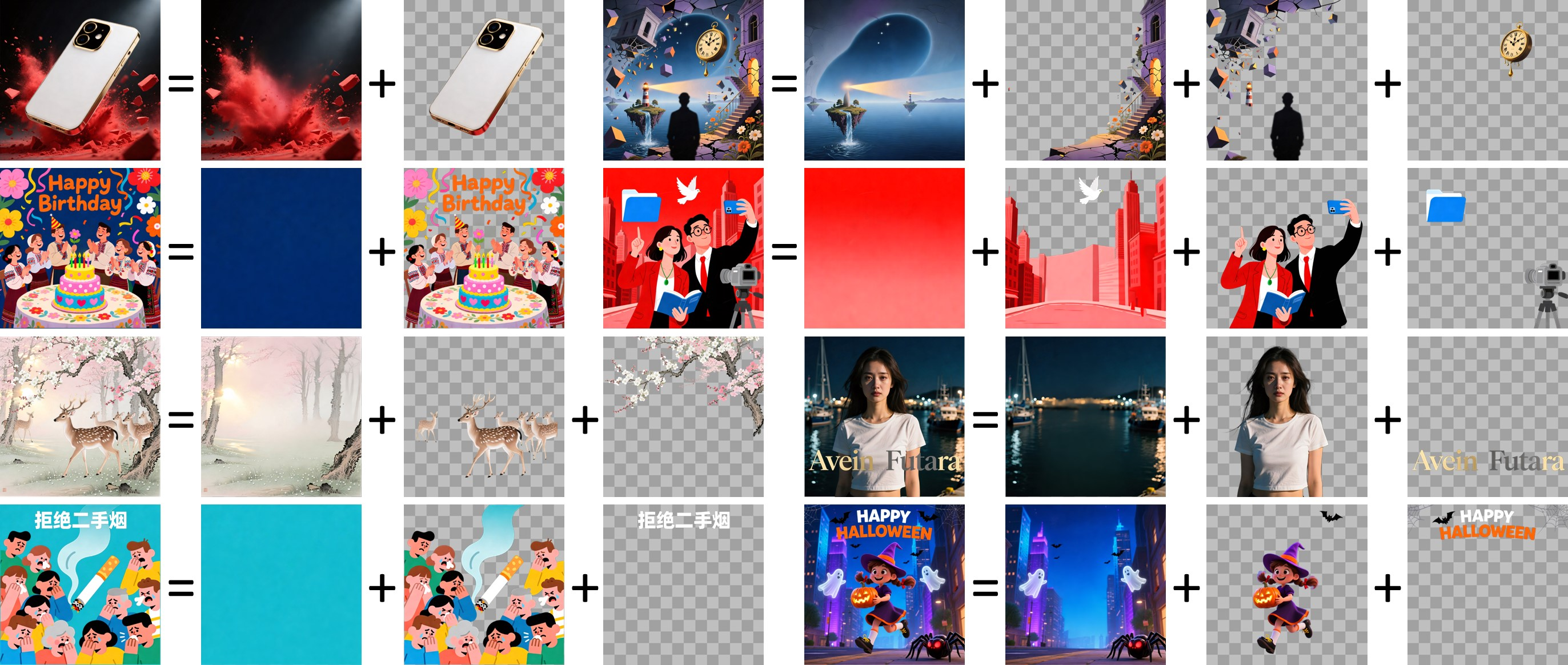
The core of Qwen Image Layered is its image layering capability: it can decompose a single RGB image into multiple RGBA layers with transparency, each corresponding to different semantic elements such as foreground characters, backgrounds, props, or text. With physical separation between layers, Qwen Image Layered supports high-fidelity removal, repainting, movement, scaling, and recoloring at the layer level, making complex edits as simple as layer operations.
Semantic RGBA Layer Decomposition
Qwen Image Layered intelligently detects semantic elements in an image, such as subjects, backgrounds, and text, and outputs multiple RGBA layers with alpha channels. These layers can perfectly reconstruct the original image while being imported separately into any image editor for further creative work.
Configurable Layer Count and Recursive Layering
In Qwen Image Layered you can specify the number of layers, for example splitting one image into 3, 4, or 8 layers to match different scene complexities. A single output layer can also be sent back into Qwen Image Layered for secondary decomposition, enabling nearly unlimited multi-level layered editing depth.
High-Fidelity Core Editing Operations
Powered by the layer structure, Qwen Image Layered supports clean object removal, free scaling, non-distorted movement, and precise color changes at the layer level. When you delete or move content on one layer, the model completes the occluded background and avoids destructive artifacts from traditional cut-and-paste, delivering more natural and stable editing results.
Try Qwen Image Layered Free Online
you can upload any image and generate multiple transparent RGBA layers in one click while previewing the layered result in real time. Each layer can be downloaded separately for poster design, character separation, background replacement, or integration into your own ComfyUI or PS workflow, showcasing the layer-level editing power of Qwen Image Layered.
Frequently Asked Questions about Qwen Image Layered
- What is Qwen Image Layered?
Qwen Image Layered is a diffusion-based model for image layering and layer editing that automatically decomposes a single RGB image into multiple semantically disentangled RGBA layers. Each layer can be edited independently without affecting other content, making it ideal for design, posters, games, and animation asset creation workflows that rely on layered projects.
- How does Qwen Image Layered improve the image editing experience?
Traditional AI editing works on a single flat canvas, which often leads to semantic drift, distorted faces, or misaligned backgrounds. Qwen Image Layered first performs layer decomposition to physically separate characters, backgrounds, and text, then applies scaling, moving, repainting, or recoloring on a specific layer. This constrains changes within that layer and yields more stable and controllable results.
- What are the main use cases for Qwen Image Layered?
Qwen Image Layered is ideal for character illustration separation, poster element layering, ad material cutouts, UI asset management, scene reconstruction, and pipelines that require batch generation of transparent PNG assets. Whether preparing rigs for animation or bulk background replacement for e-commerce images, Qwen Image Layered quickly produces ready-to-use layered assets.
- Can I use my own images with Qwen Image Layered for layering?
Yes. Simply upload an image in the Qwen Image Layered demo or compatible applications, choose the desired number of layers, and the model will output multiple corresponding RGBA layer files. You can download each layer and continue editing and compositing in tools such as Photoshop, Krita, or ComfyUI.